
Table of Contents
- What is IPTV and how does it work
- Best IPTV services for watching movies
- Best IPTV services for football
- How to set up IPTV on any device
- Is IPTV legal
- IPTV vs cable vs streaming apps
- Conclusion
A couple of years ago I was sitting in my living room here in Mesa, Arizona, staring at a cable bill that had somehow crept past 165 dollars a month. On top of that I was paying for Netflix, Hulu, HBO Max, and a couple other streaming apps I barely used. The total was north of two hundred bucks, and I still could not find half the movies I wanted to watch on any given Friday night. Game days were even worse — half the football matchups I cared about were locked behind premium sports tiers that cost extra on top of everything I was already paying.
That frustration is what pushed me to explore IPTV service for the first time. A buddy of mine had been using it for months and kept telling me I was throwing money away on cable. I did not believe him until he showed me his setup. Every channel I could think of. A movie library deeper than anything I had seen on any single streaming app. NFL games, college football, even international soccer. All running through his internet connection with no cable box, no satellite dish, and a monthly cost that was less than what I was paying for Netflix alone.
I went home that night and started researching. And what I found changed the way I watch TV completely.
This guide is everything I have learned about IPTV service over the past two years — from understanding the technology to picking the right provider, setting it up on your devices, navigating the legal landscape, and comparing costs against cable and streaming apps. Whether you are a football fan tired of missing games, a movie lover drowning in subscriptions, or just someone who wants to stop overpaying for entertainment, this is the roadmap I wish I had when I started.
What is IPTV and how does it work
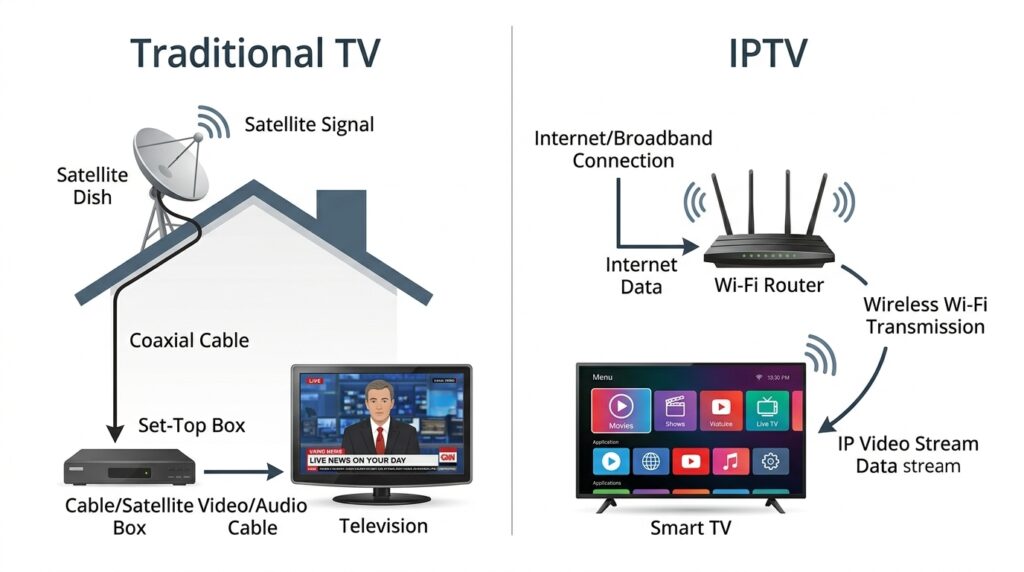
IPTV stands for internet protocol television. The name sounds technical but the concept is as straightforward as it gets. Instead of receiving TV signals through a cable line running into your house or a satellite dish bolted to your roof, IPTV delivers television content over your internet connection — the same one you use to browse the web, check email, and scroll through social media.
Traditional cable works by pushing a fixed bundle of channels through a physical infrastructure of coaxial cables and distribution hubs. You get whatever the cable company decides to include in your package, and if you want more, you pay for a higher tier. Satellite TV works similarly but uses a dish on your roof to receive signals from satellites orbiting overhead. Both systems have been around for decades and both come with the same core limitation — you are locked into whatever the provider offers at whatever price they set, plus a pile of extra fees that magically appear on your bill every month.
IPTV takes a completely different approach. Content is stored on servers in data centers around the world. When you select a channel or a movie, that server sends the video data to your device in small packets through your internet connection. Your device — whether it is a smart TV, an Amazon Firestick, a phone, or a laptop — receives those packets and assembles them into the video playing on your screen. This all happens in real time, so the experience feels just like watching traditional TV. You select something and it plays.
There are three main formats that most IPTV services use. Live IPTV lets you watch broadcasts as they happen in real time — live sports, live news, live events. Video on demand, commonly called VOD, gives you access to a library of movies and shows you can watch whenever you want, similar to how Netflix works. Time-shifted IPTV acts like a built-in DVR, letting you go back and watch content that already aired within a catch-up window that typically ranges from 24 to 72 hours depending on the provider.
Most quality providers bundle all three of these together into one subscription, which is a big part of what makes IPTV so appealing. You get live channels, an on-demand library, and catch-up functionality all under one roof for one monthly payment.
The only real requirement on your end is a stable internet connection. For standard HD streaming, you want at least 15 Mbps. For 4K content, aim for 25 Mbps or higher. If multiple people in your household are streaming at the same time, factor in additional bandwidth for each device.
If you want a deeper dive into the technology, the different types of IPTV, and how it compares to regular streaming apps, I put together a detailed breakdown of what IPTV is and how it works that covers all of it step by step.
Best IPTV services for watching movies
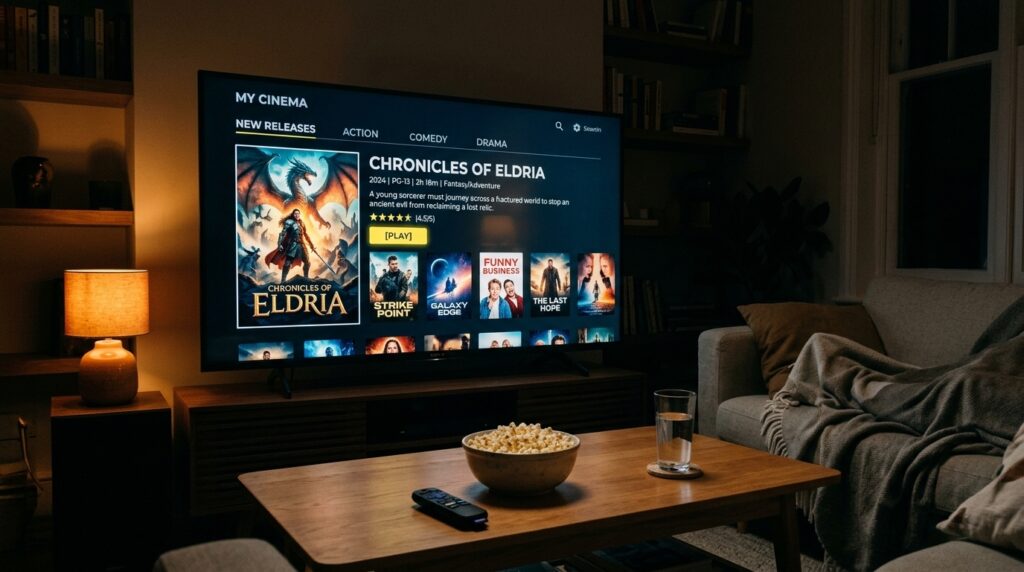
If you are anything like me, movie night is sacred. After a long week of work, there is nothing better than sinking into the couch, grabbing some popcorn, and finding something great to watch. But for years, finding that something great meant jumping between five or six different streaming apps trying to remember which service had which movie. Half the time the film I wanted had been removed from one platform and moved to another, or it was only available as a paid rental on top of the subscription I was already paying for.
That experience — the endless scrolling, the app switching, the nickel-and-diming — is one of the biggest reasons I started looking into IPTV for movies specifically. And what I found genuinely surprised me.
A good IPTV service gives you access to a video on demand library that dwarfs what any single streaming app offers. We are talking thousands of titles spanning every genre — new releases, classic films, action, drama, horror, comedy, documentaries, international cinema, and yes even those old westerns I have a soft spot for. All of it accessible through one app with one login and one monthly payment.
But not every IPTV provider handles movies the same way. After testing several services over the past couple of years, I have identified the specific qualities that separate a decent movie experience from a great one.
Library depth and quality is the first thing I evaluate. Some providers advertise massive movie counts — ten thousand titles or more — but when you actually start browsing, a large chunk of that catalog is low-budget filler you have never heard of and never will. The best providers balance quantity with quality, carrying major studio releases alongside a solid back catalog of well-known films from every decade. A provider with three thousand quality titles is more valuable than one with ten thousand titles where most of them are unwatchable.
Content update frequency matters more than most people realize. A VOD library is only as good as its freshness. The best movie-focused IPTV services update their libraries weekly, adding new releases and rotating content to keep things interesting. If you sign up for a service and notice the newest movies are from six months ago, that is a red flag worth paying attention to.
Organization and search functionality can make or break the experience. When you have thousands of movies available, you need a way to find what you want without scrolling endlessly. The best IPTV apps let you search by title, browse by genre, filter by year, and even sort by popularity or rating. A cluttered interface with no logical organization will frustrate you faster than a slow drive on the I-10 during rush hour.
Picture quality is another factor I take seriously. When I first started exploring IPTV, I assumed the video quality would be rough — grainy, buffery, the kind of experience that makes you want to throw the remote. I was wrong. The better providers stream movies in full HD and many offer 4K content for devices that support it. Some even support HDR, which makes a noticeable difference if your TV can handle it. The quality honestly rivals what you get from Netflix or any other mainstream platform, as long as your internet connection is solid.
Multi-device support rounds out the list. Sometimes I start a movie on the living room TV and want to finish it on my tablet in bed. Other times I am traveling and want to watch something on my phone during a layover at Sky Harbor. A good provider lets you use multiple devices under one subscription, and the best ones allow simultaneous connections so different people in your household can watch different things at the same time.
The bottom line is that IPTV consolidates what would normally require four or five separate streaming subscriptions into one service at a fraction of the combined cost. Instead of paying 80 to 120 dollars a month for a stack of apps that each hold a piece of the content puzzle, you get access to a comprehensive library for 10 to 25 dollars.
For a closer look at specific features, VOD comparisons, and what to watch out for when choosing a provider for film, I wrote a full review of the best IPTV services for movies that goes deeper into each of these factors.
Best IPTV services for football
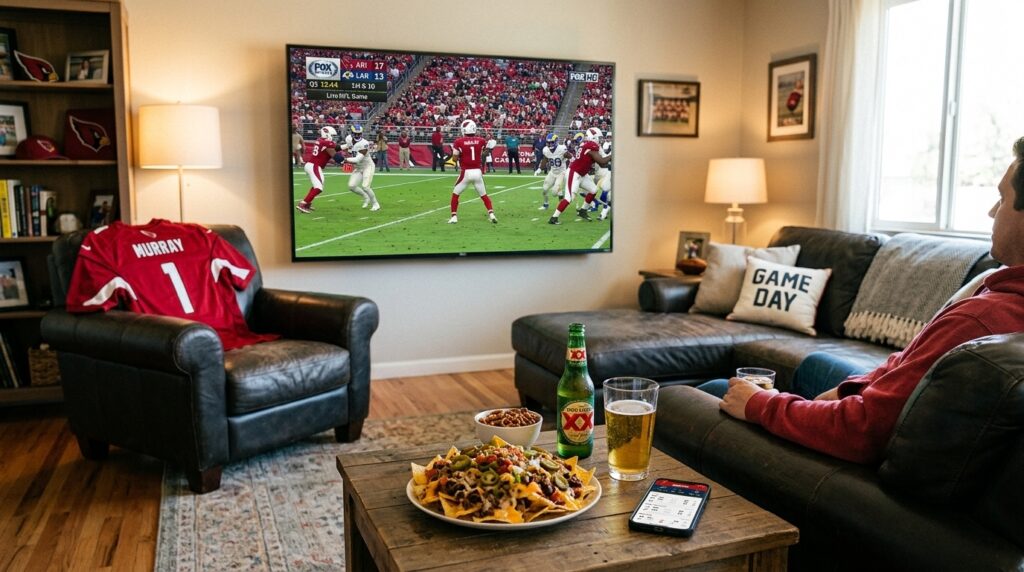
Football is the one thing I refuse to compromise on. I will eat cheaper groceries, I will drive an older truck, I will skip the fancy coffee — but do not mess with my game day. If I cannot watch the Cardinals on Sunday, catch the ASU game on Saturday, or tune into a Premier League match early in the morning, something has gone seriously wrong with my setup.
For years, cable was the only reliable way to get full football coverage. DirecTV had NFL Sunday Ticket locked down. ESPN required a cable subscription. Regional sports networks were bundled into expensive tiers. The whole system was designed to keep you paying top dollar just to watch the sport you love.
But the landscape has shifted dramatically, and IPTV has emerged as a legitimate alternative for football fans who want comprehensive coverage without the premium price tag.
A solid IPTV service carries the major networks that broadcast football — ESPN, Fox Sports, CBS Sports, NBC Sports, NFL Network, and in many cases regional sports networks that cover local teams. Most providers also include international sports channels, which is a big deal here in Arizona where a large number of fans follow Liga MX and the Premier League alongside the NFL and college ball.
The channel coverage alone would be enough to get my attention, but what really matters for live sports is performance under pressure. And this is where football fans need to be more selective than casual viewers.
Stream stability during live games is the single most important factor. Watching movies through IPTV is forgiving — if the stream hiccups for two seconds during a quiet dialogue scene, you barely notice. Football is a completely different animal. A two-second buffer during a fourth-quarter touchdown pass will ruin your entire afternoon. The providers that invest in quality server infrastructure deliver consistent performance even during peak viewing windows like Sunday afternoons and Monday nights. The cheaper services tend to buckle under exactly that kind of load, which is the worst possible time for them to fail.
Low latency is another factor that casual viewers do not think about but sports fans absolutely should. Latency is the delay between the live broadcast and what actually appears on your screen. Some IPTV services run 15 to 30 seconds behind the real-time broadcast. That means your neighbor is cheering a touchdown while you are still watching the play develop. If you are checking scores on your phone or chatting in a group text during the game, that delay becomes maddening. The best providers keep latency to a minimum, usually within five to ten seconds of live.
DVR and catch-up features matter because life does not always cooperate with kickoff times. Sometimes work runs late. Sometimes the family has plans. Sometimes you simply cannot be in front of the TV when the game starts. Some IPTV providers include cloud DVR functionality that lets you record live games and watch them later. Others offer catch-up windows that let you rewind and watch content that aired within the last 24 to 72 hours. Not every provider includes these features, so if recording games is a priority for you, make sure you verify this before subscribing.
Multi-screen viewing is one of my favorite IPTV features for football season. During college football Saturdays when three ranked matchups are happening at the same time, being able to watch two games simultaneously — or have one on the TV and another on a tablet — is an absolute lifesaver. Some IPTV apps support split-screen or picture-in-picture viewing on compatible devices. Others allow multiple simultaneous connections under one subscription, which means different screens in your house can show different games at the same time. Cable companies usually charge extra for this. With the right IPTV provider, it is included in the base subscription.
Let me break down the channel requirements by the type of football you follow. NFL coverage revolves around CBS, Fox, NBC, ESPN, and NFL Network. College football is spread across ESPN networks, Fox Sports networks, ABC, and conference-specific channels like the SEC Network and Big Ten Network. International football requires beIN Sports, NBC Sports for Premier League, and channels like TUDN and Fox Deportes for Liga MX. A quality IPTV provider bundles most or all of these together without requiring separate sports tier add-ons, which is where cable and even some streaming services fall short.
Before committing to any provider long-term, I strongly recommend testing it during an actual live football broadcast. Watch a full game from start to finish. Pay attention to buffering, freezing, picture quality, and latency. If the service holds up under real game day conditions, that is a provider worth keeping. If it does not, move on — no matter how good the price looks.
For a deeper dive into specific provider evaluations, channel breakdowns by football type, and tips on getting the best live sports experience, I wrote a complete guide to the best IPTV services for football that covers everything a sports fan needs to know.
How to set up IPTV on any device
I will be honest with you — when I first decided to try IPTV, the setup part made me nervous. I am a guy who writes articles and watches football. I am not a tech wizard. The idea of configuring apps, entering server URLs, and sideloading software onto my Firestick sounded like something way outside my comfort zone.
Turns out the whole thing took me about ten minutes. And once I did it the first time, setting it up on my other devices was even faster. If I can handle this sitting in my living room with zero technical background, I promise you can too.
Before you touch any device, you need a few things ready. First, your IPTV subscription details — when you sign up with a provider, they send you login credentials that typically include a username, a password, and a server URL. Some providers call this an M3U URL or Xtream Codes login. Keep this information handy because you will need to enter it during setup. Second, a stable internet connection — at least 15 to 25 Mbps for a smooth experience. Third, a compatible device and an IPTV player app to run on it.
The most popular device for IPTV by far is the Amazon Firestick, and for good reason. It is affordable — usually 30 to 50 dollars for a one-time purchase — portable, and powerful enough to handle HD and 4K streaming without any issues. The setup process involves enabling apps from unknown sources in your Firestick settings, installing a free tool called the Downloader app, using it to download your IPTV application, and then entering your subscription credentials. Five steps total, ten minutes or less, and you are watching live TV and movies.
Smart TVs are another popular option. If you have an Android-based smart TV from brands like Sony, TCL, or Hisense, you can download IPTV apps directly from the Google Play Store. Samsung and LG TVs use their own operating systems — Tizen and webOS respectively — but both have IPTV apps available through their built-in app stores. The process is essentially the same — find the app, install it, enter your credentials, and start watching.
One thing I learned from personal experience is that smart TV apps sometimes feel a little slower than using a dedicated streaming device. The processors inside televisions are not always as fast as what you get in a Firestick or Android box, especially on older models. If your smart TV is more than a few years old and the IPTV app feels sluggish, picking up a Firestick is a cheap and effective upgrade.
Android phones and tablets are probably the easiest devices to set up. Open the Google Play Store, search for your IPTV app — IPTV Smarters Pro, TiviMate, and GSE Smart IPTV are the most common options — install it, enter your credentials, and you are done in about two minutes. You can even cast your phone screen to a TV using Chromecast if you want a bigger viewing experience. I have done this in hotels while traveling and it works perfectly.
iPhones and iPads require a slightly different approach because Apple’s App Store has stricter policies about which apps they allow. Some IPTV apps that are freely available on Android may not be listed on the App Store. That said, GSE Smart IPTV is available for iOS and works well. Some providers also have their own iOS-compatible app. The setup follows the same general pattern — download the app, enter your playlist credentials, and start streaming.
Windows computers work too, and the setup is simple. VLC Media Player — a free program most people already have installed — can play IPTV streams directly. You open VLC, go to Media, select Open Network Stream, paste in your M3U URL, and hit play. Alternatively, dedicated IPTV apps like MyIPTV Player are available in the Microsoft Store and offer a more organized interface with channel categories and favorites.
The most common issues people run into during setup are minor and easy to fix. Incorrect credentials cause most connection failures — double-check every character in your username, password, and server URL. Buffering usually points to an internet speed issue, so run a speed test and make sure you are meeting the minimum requirements. If an app installs but will not open, a simple device restart typically resolves it. And if channels load but the video shows a black screen, switching the player type in the app settings from the default to an alternative option usually does the trick.
For detailed step-by-step instructions for each specific device with screenshots and troubleshooting tips, I put together a complete setup guide for IPTV on any device that walks you through the entire process from start to finish.
Is IPTV legal
This is the question that comes up more than any other, and I am glad it does. Every time someone asks me about IPTV, the legality concern surfaces within the first few minutes of conversation. At barbecues, in text messages, at the sports bar — people want to know if they are going to get in trouble for using this stuff.
The short answer is that it depends on the provider. The longer answer requires some explanation, and I think every person considering IPTV deserves to understand exactly where the legal boundaries are before spending a dime.
Let me start with the most important point. IPTV as a technology is completely legal. There is absolutely nothing illegal about delivering television content over the internet. In fact, you are probably already using IPTV without realizing it. When you watch YouTube TV, Hulu with Live TV, Sling TV, or FuboTV, you are using internet protocol television. These services deliver live channels and on-demand content through your internet connection, which is the textbook definition of IPTV. They do it with full licensing agreements with the content owners and broadcasters, which makes them entirely legitimate.
The technology is not the problem. The problem is licensing. The legality of any specific IPTV service comes down to one fundamental question — does the provider have the legal right to distribute the content they are offering? If yes, you are in the clear. If no, things get complicated.
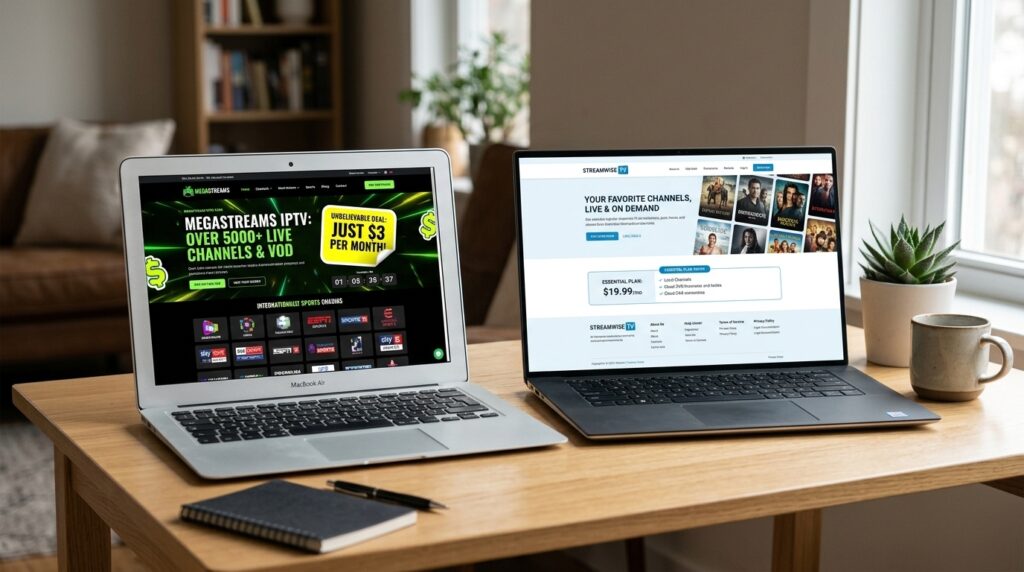
And here is where the landscape gets murky. There are hundreds of IPTV providers operating right now, and a significant number of them do not hold proper licensing agreements for the content they distribute. They offer thousands of live TV channels and massive movie libraries at prices that seem impossibly low — sometimes three to five dollars a month for what would normally cost ten times that through legitimate channels. That pricing should immediately raise a red flag.
Licensing content from networks like ESPN, Fox, HBO, and the major broadcast networks costs real money. When a provider offers you five thousand channels for pocket change, they are almost certainly not paying licensing fees. They are rebroadcasting streams they do not have the legal right to distribute, which puts them squarely in violation of copyright law.
For consumers, identifying the difference between a legitimate provider and an unlicensed one is not always easy because the unlicensed services often look just as professional. They have polished websites, responsive customer support, active social media pages, and apps that run smoothly. From the outside, everything appears legitimate until it suddenly is not.
There are specific things I look for when evaluating whether a provider is operating within the law. Transparent business information is the first one — a real company name, a registered business address, and clear contact details. If the only way to reach a provider is through a Telegram channel or an anonymous email, that is a warning sign. Reasonable pricing is another indicator — licensed content distribution costs money, so a provider charging 10 to 25 dollars a month for a reasonable channel selection is within the range of legitimacy, while one offering everything for three dollars is almost certainly cutting corners on licensing. Availability on official app stores like Google Play, the Apple App Store, or the Amazon App Store is a positive sign, since these platforms have review processes that filter out the most blatant offenders. Clear terms of service, privacy policies, and refund policies also point toward a legitimate operation.
The risks of using an unlicensed IPTV service go beyond just the legal question. These services get shut down regularly, sometimes overnight, and when they disappear your money goes with them. There is no customer service line to call, no refund process, no recourse. If you paid for a six-month or annual plan upfront, that investment is gone. Some unlicensed apps also require sideloading software from unverified sources, which opens the door to malware, spyware, and other security threats that can compromise your device and personal information.
In the United States, copyright law protects content creators and distributors through the Digital Millennium Copyright Act, commonly known as the DMCA. Under this law, distributing copyrighted material without authorization is illegal, and providers who get caught face criminal charges, heavy fines, and potential imprisonment. For individual users, the legal risk has historically been lower — enforcement efforts have primarily targeted the providers and distributors rather than the end viewers. However, the trend is shifting. Internet service providers have begun sending warning notices to customers whose IP addresses were detected accessing unlicensed streaming services. While these warnings have not typically resulted in legal action against individual users so far, they signal a tightening of enforcement that could escalate in the future.
If you want the IPTV experience without any legal concerns, there are fully licensed options available. YouTube TV, Hulu with Live TV, Sling TV, FuboTV, and Philo all deliver live television and on-demand content through internet protocol with full licensing agreements in place. They cost more than unlicensed providers — ranging from 25 to 77 dollars a month depending on the service and plan — but they come with legal peace of mind, reliable performance, proper customer support, and the assurance that the people creating the content you enjoy are being fairly compensated.
My personal take is simple. The savings from using an unlicensed service are not significant enough to justify the potential headaches — whether those headaches come in the form of a sudden service shutdown, a warning letter from your ISP, malware on your device, or worse. Do your research, verify your provider, and choose a service you can use comfortably without looking over your shoulder.
For a much deeper exploration of this topic including specific red flags to watch for, a closer look at US copyright law as it applies to IPTV, and a detailed breakdown of legitimate alternatives, I wrote an honest guide to IPTV legality that covers everything you need to make an informed decision.
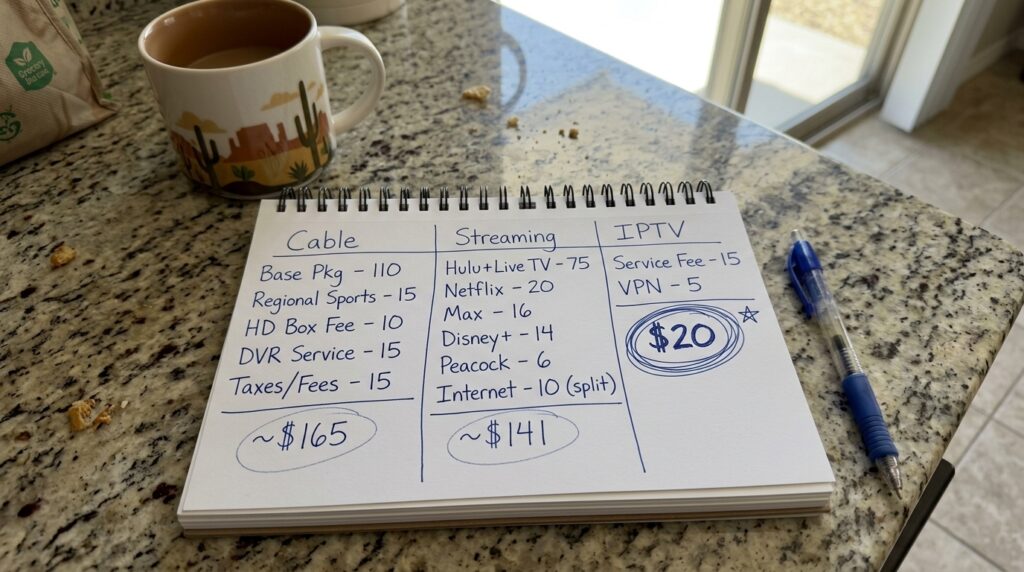
IPTV vs cable vs streaming apps
This is the section where everything comes together, because at the end of the day the decision comes down to one question — which option gives you the most value for your money? Not the most channels. Not the fanciest interface. Value. Content you actually watch at a price that makes sense for your budget.
I spent years paying for cable without ever questioning it. That is just what you did — you called the cable company, they sent someone out, and you had TV. Then streaming apps came along and I started adding those on top of cable because each one had something the others did not. Netflix for movies. Hulu for shows. HBO Max for prestige content. ESPN Plus for sports extras. Before I knew it I was paying for cable and a stack of streaming subscriptions, and my monthly entertainment bill was pushing past two hundred dollars.
The night I sat down and actually ran the numbers was the night everything changed. And I think running your own numbers will have the same effect on you.
Cable TV looks affordable on the surface. Providers here in the Phoenix metro like Cox advertise packages starting around 55 to 85 dollars a month, which sounds reasonable until the real bill arrives. Equipment rental fees add 10 to 15 dollars per month per cable box. DVR service tacks on another 10 to 20 dollars. Broadcast TV fees — which charge you for local channels you could technically receive for free with an antenna — add 15 to 25 dollars. Regional sports fees add another 5 to 10 dollars. Then taxes and regulatory fees pile on an additional 5 to 15 dollars. By the time everything is added up, that 55 dollar package has become 100 to 170 dollars a month. And if you want premium channels or a full sports tier, you are looking at 150 to 200 dollars or more. I know this because I lived it for years.
Stacked streaming subscriptions were supposed to be the escape from cable pricing, but in 2024 they have created almost the exact same problem. Netflix runs about 15.49 a month on the standard plan. Hulu without ads is 17.99. Max is 15.99. Disney Plus without ads is 13.99. Amazon Prime Video is 8.99. Apple TV Plus is 9.99. Peacock Premium is 13.99. Paramount Plus without ads is 11.99. ESPN Plus is 10.99. Subscribe to five or six of those — which many households do — and you are spending 70 to 120 dollars a month, and that is without a single live TV channel. Add a live TV streaming service like YouTube TV at 72.99 or Hulu with Live TV at 76.99 and you are right back in the 150 to 200 dollar range. The irony is painful. People cut cable to save money and ended up spending the same amount spread across a dozen different logins.
IPTV service changes the math entirely. A reputable provider typically charges between 10 and 25 dollars a month. For that price you get live TV channels numbering in the hundreds or thousands, a video on demand library with thousands of movies and shows, catch-up viewing for recently aired content, and multi-device support. One subscription. One login. One payment. At the high end of IPTV pricing you are paying roughly what a single streaming app costs, but getting the equivalent of cable plus multiple streaming libraries combined.
The annual savings are significant. If you are currently spending 150 dollars a month on cable or 120 dollars a month on streaming subscriptions, switching to a 20 dollar a month IPTV service saves you between 100 and 130 dollars every month. Over a full year that adds up to 1200 to 1560 dollars. That is real money — enough for a weekend trip up to Sedona or a solid chunk of your annual savings.
Beyond just cost, the three options differ in ways that matter depending on how you actually watch TV.
Channel selection favors IPTV. Cable gives you a curated selection based on your package tier. Each streaming app only offers its own content. IPTV provides the widest range — hundreds to thousands of channels from multiple networks and countries in one place.
On-demand content is where streaming apps have traditionally excelled, but IPTV has closed the gap significantly. A single IPTV subscription often includes a VOD library that rivals the combined catalogs of several streaming platforms. The one area where streaming apps maintain an edge is original exclusive content — shows and movies produced specifically for platforms like Netflix or Disney Plus.
Live sports tilts strongly in favor of IPTV. Cable handles sports well but charges premium rates for full sports access. Streaming apps require expensive live TV add-ons. IPTV includes sports channels as a standard feature with no additional tier required, which makes it the most affordable path to comprehensive football coverage by a wide margin.
Contracts and flexibility favor both IPTV and streaming apps over cable. Cable companies often push one or two year contracts with early termination fees. Streaming apps and IPTV services are almost universally month-to-month with no long-term commitment required. You pay for what you use and you can cancel anytime.
Device flexibility is a tie between IPTV and streaming apps. Both work on virtually any device — smart TVs, streaming sticks, phones, tablets, computers — and both travel with you. Cable is tied to your cable box and your home, which feels increasingly limiting in a world where people want their content to follow them wherever they go.
There are some hidden costs worth considering regardless of which option you choose. All three require an internet connection, but since most people already pay for internet regardless of how they watch TV, this is typically not an additional expense. Cable requires equipment rental, which is a recurring monthly fee. IPTV and streaming apps require a compatible device, but most people already own one, and if you need to buy a Firestick the one-time cost is 30 to 50 dollars. Cable and streaming app prices have both been rising steadily over the past several years. IPTV pricing has remained comparatively stable.
The right choice depends on your viewing habits and priorities. If you value simplicity above all else and do not mind paying a premium for a familiar plug-and-play experience, cable still works. If you are primarily an on-demand viewer who watches series and movies on your own schedule and does not care much about live TV, a couple of strategically chosen streaming apps is a smart approach. But if you want live sports, a deep movie library, flexibility across devices, and freedom from contracts — all without spending a hundred dollars or more every month — IPTV is the option that delivers the most value for the least cost. And it is not even close.
For a full breakdown with detailed cost tables, feature comparisons, and specific recommendations based on different viewer profiles, I wrote a complete IPTV vs cable vs streaming cost comparison that lays everything out side by side so you can see exactly where your money goes with each option.

Two years ago I was spending over two hundred dollars a month on cable and streaming subscriptions, constantly frustrated by missing channels, fragmented content libraries, and a cable bill that somehow found new fees to add every few months. Today I pay a fraction of that and have access to more live football, more movies, and more flexibility than I ever had with my old setup.
IPTV is not some futuristic technology reserved for tech-savvy people. It is a straightforward, practical alternative to the bloated entertainment systems most of us have been paying for out of habit. The technology is simple — television delivered through your internet connection. The setup takes minutes on any device. The content is vast. And the cost savings are genuinely significant enough to change how you think about your monthly budget.
But like anything worth doing, it is worth doing right. Take the time to understand what IPTV is and how it works before jumping in. Choose a provider that operates legitimately and has a verifiable track record. Test the service during a live football game or a movie night before committing to a long-term plan. Compare the costs against what you are currently paying and let the numbers guide your decision rather than flashy advertising or prices that seem too good to be true.
Throughout this guide I have covered the core topics that matter — the technology behind IPTV, what to look for in a movie-focused provider, how to evaluate services for live football, the step-by-step setup process for every major device, the legal landscape you need to navigate, and a head-to-head cost comparison against cable and streaming apps. Each of those topics goes deeper than what I could cover here, which is why I built out dedicated pages for each one that you can explore at your own pace.
If I had to point you toward one place to start right now, it would be the step-by-step guide on how to set up IPTV on any device. Because once you see how quick and painless the setup actually is, the rest of the decisions — which provider to choose, which content to prioritize, how much you can save — start falling into place naturally.
I am not going to sit here and tell you that IPTV is perfect for every single person. It is not. Some people genuinely prefer the simplicity of cable and do not mind paying extra for it. Others are happy rotating between a couple of streaming apps and keeping things minimal. Both of those approaches are perfectly valid.
But if you are a football fan who is tired of paying premium prices just to watch the games you care about, or a movie lover who is exhausted by the endless app switching and subscription stacking, or simply someone who looked at their entertainment budget last month and thought there has to be a better way — there is. And you are looking at it.
Take your time. Do your homework. Pick a provider you trust. And then sit back, fire up that Firestick, and enjoy every touchdown and every movie night without that cable bill breathin’ down your neck.