Table of Contents
- The moment I actually ran the numbers
- What cable TV really costs in 2024
- What stacked streaming subscriptions actually add up to
- What IPTV costs and what you get for it
- Side-by-side cost comparison
- Feature comparison beyond just price
- Which option fits which type of viewer
- The hidden costs nobody talks about
- Final thoughts
I am going to tell you about the moment that changed everything for me. It was a random Tuesday night here in Mesa and I was going through my bank statements trying to figure out where all my money was going each month. Rent, utilities, groceries, gas — all the usual stuff. Then I got to the entertainment section and just sat there staring at the screen.
Between my Cox cable bill, Netflix, Hulu, HBO Max, Disney Plus, and ESPN Plus, I was spending over two hundred dollars a month just to watch TV. Two hundred bucks. Every single month. For years.
That was the night I sat down with a notepad and actually compared every option available to me — cable, streaming apps, and IPTV — dollar for dollar, feature for feature. And the results honestly made me a little mad that I had not done this sooner.
If you are in the same boat I was, wondering whether there is a smarter way to spend your entertainment budget without losing the content you care about, this breakdown is for you. No fluff. Just real numbers and honest comparisons.
What cable TV really costs in 2024
Let me start with cable because that is what most of us grew up with and what a lot of people are still paying for out of pure habit.
The advertised price for cable TV packages always looks reasonable on the surface. Cox, which is the dominant provider here in the Phoenix metro, advertises packages starting around 55 to 60 dollars a month for a basic plan. Sounds manageable right? But that number is just the beginning.
Once you add in the fees that show up on the actual bill, the real cost looks very different.
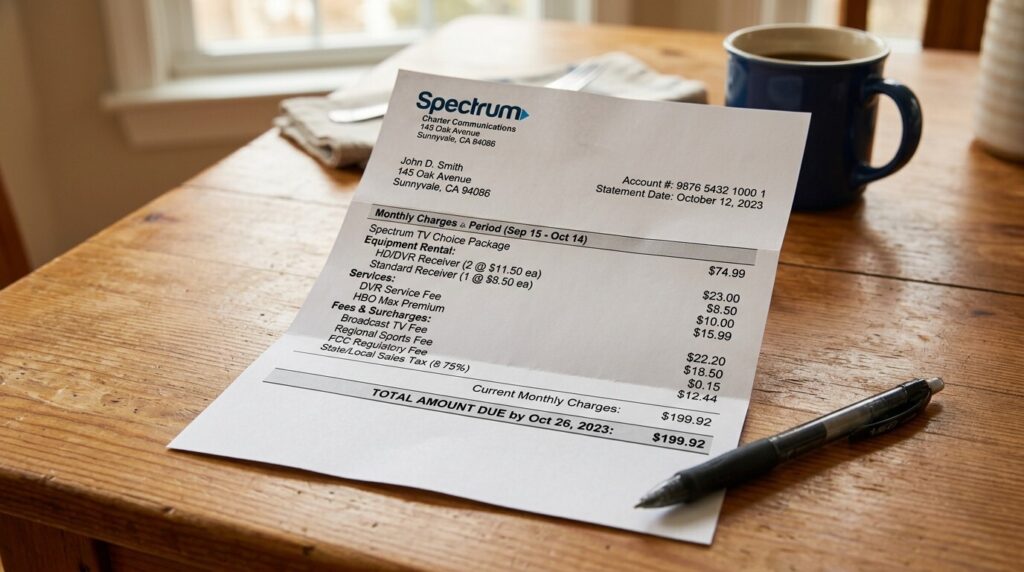
Equipment rental fees. Cable companies charge you to use their cable box and remote. This typically runs five to fifteen dollars per month per box. If you have two TVs in your house, that is two boxes and double the fee.
DVR fees. Want to record shows and games? That is another ten to twenty dollars a month for DVR service, depending on your provider and how much storage you want.
Regional sports network fees. These sneaky little charges show up as separate line items and typically add three to ten dollars a month. You often cannot opt out of them even if you do not watch sports.
Broadcast TV fees. This one always gets me. Cable companies charge you a fee to deliver the same local broadcast channels — ABC, CBS, NBC, Fox — that you could technically pick up for free with an antenna. This fee ranges from fifteen to twenty-five dollars a month depending on the provider.
Taxes and regulatory fees. These vary by location but typically add another five to fifteen dollars on top of everything else.
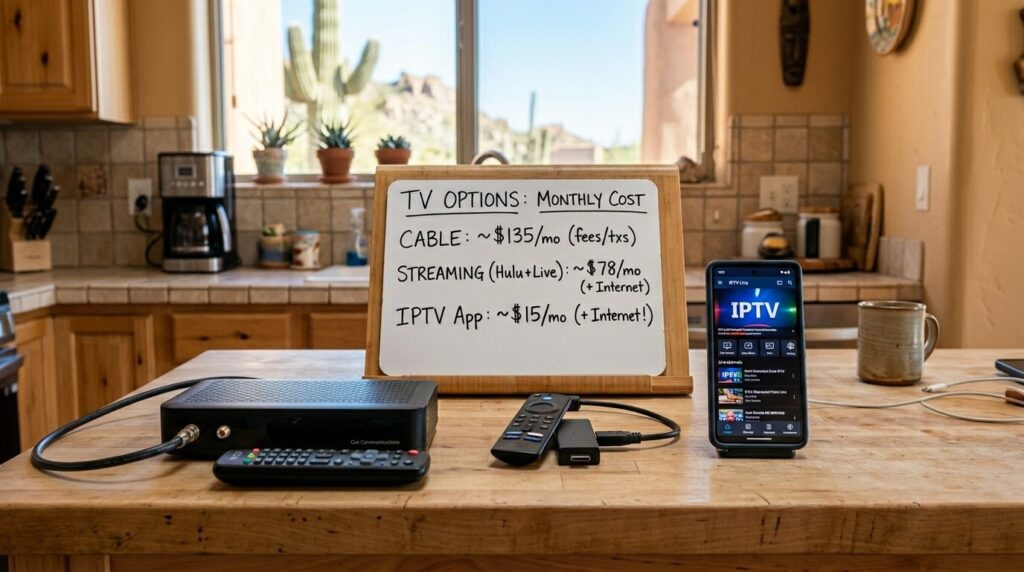
When you stack all of these together, that 55 dollar advertised package suddenly becomes 100 to 150 dollars a month. And if you want a package that includes premium channels like HBO, Showtime, or a full sports tier, you are looking at 150 to 200 dollars or more.
I know this because I lived it. My Cox bill was consistently around 165 dollars a month by the time everything was added up, and I did not even have every channel I wanted.
What stacked streaming subscriptions actually add up to
A lot of people cut the cord on cable and moved to streaming apps thinking they were saving money. And at first they were. When Netflix was the only game in town, one subscription covered just about everything you could want.
But in 2024 the streaming landscape looks completely different. Every major studio launched its own platform, and the content is fragmented across all of them. If you want access to a decent range of movies and shows, you end up subscribing to multiple services.
Here is what the major streaming apps cost right now on their standard ad-free plans.
Netflix standard runs about 15.49 a month. Hulu with no ads is 17.99. HBO Max, now just called Max, is 15.99. Disney Plus without ads is 13.99. Amazon Prime Video is 8.99 if separated from the full Prime membership. Apple TV Plus is 9.99. Peacock Premium is 13.99. Paramount Plus without ads is 11.99. ESPN Plus is 10.99.
If you subscribe to all nine of those — and a lot of households do subscribe to at least five or six of them — your monthly total lands somewhere between 80 and 120 dollars. That is without any live TV channels whatsoever.
If you want live TV through a streaming platform, you need to add something like YouTube TV at 72.99 a month, Hulu with Live TV at 76.99, or FuboTV starting around 74.99. Add one of those to your existing streaming stack and you are right back in the 150 to 200 dollar range — the same territory cable sits in.
The irony is not lost on me. People cut cable to save money and ended up spending the same amount spread across a dozen different apps instead.
What IPTV costs and what you get for it
Now here is where things get interesting. IPTV subscriptions from reputable providers typically cost between 10 and 25 dollars a month. Some offer quarterly or annual plans that bring the monthly cost down even further.
For that price, most providers include live TV channels numbering in the hundreds or thousands, a video on demand library with thousands of movies and shows, catch-up or time-shifted viewing for recently aired content, and support for multiple devices.
Let me put that in perspective. For roughly the cost of a single streaming app subscription, IPTV gives you live TV channels that would require a cable package plus a VOD library that competes with multiple streaming apps combined. All in one service. One login. One monthly payment.
The savings are dramatic. If you were spending 150 dollars a month on cable or 120 dollars a month on stacked streaming subscriptions, switching to a 20 dollar a month IPTV service saves you between 100 and 130 dollars every single month. Over a full year that adds up to 1200 to 1560 dollars back in your pocket.
I want to be clear though — not all IPTV providers are equal. The ones charging three to five dollars a month should raise suspicion. Quality servers, regularly updated content libraries, and reliable customer support cost money to maintain. Aim for providers in the 10 to 25 dollar range that have solid reputations and verifiable reviews. If you are unsure about the legal side of things, I covered that in detail in an honest breakdown of IPTV legality that explains exactly what to look for and what to avoid.
Side-by-side cost comparison
Let me lay this out in plain numbers so you can see the difference at a glance. These figures represent realistic monthly costs for a viewer who wants live TV, sports, movies, and on-demand content.
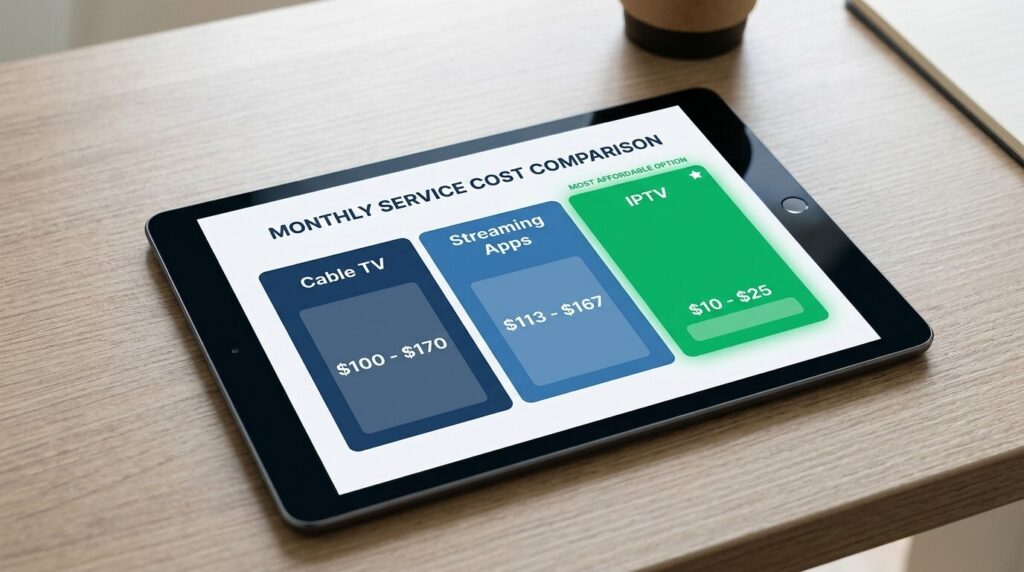
Cable TV — realistic monthly cost. Base package 55 to 85 dollars. Equipment rental 10 to 15 dollars. DVR service 10 to 20 dollars. Broadcast TV fee 15 to 25 dollars. Regional sports fee 5 to 10 dollars. Taxes and fees 5 to 15 dollars. Total realistic monthly cost ranges from 100 to 170 dollars.
Stacked streaming apps — realistic monthly cost. Three to five streaming apps at 10 to 18 dollars each totals 40 to 90 dollars. Add a live TV streaming service like YouTube TV or Hulu Live at 73 to 77 dollars. Total realistic monthly cost ranges from 113 to 167 dollars.
IPTV service — realistic monthly cost. IPTV subscription 10 to 25 dollars. Internet connection which you already have and would be paying for regardless. Total realistic monthly cost ranges from 10 to 25 dollars.
The difference speaks for itself. Even at the high end of IPTV pricing, you are paying a fraction of what cable or stacked streaming costs.
Feature comparison beyond just price
Price is important but it is not the only factor. Let me compare the three options across the features that actually matter to everyday viewers.
Channel selection. Cable offers a curated selection of channels based on your package tier. Streaming apps give you only the content owned by that specific platform. IPTV typically offers the widest selection — hundreds to thousands of channels from multiple countries and networks in one place.
On-demand content. Cable has limited on-demand options through your cable box. Streaming apps excel here with deep on-demand libraries but only within their own catalog. IPTV combines live channels with a massive VOD library, often rivaling multiple streaming apps combined.
Live sports. Cable handles live sports well but premium sports channels usually cost extra. Streaming apps require a separate live TV add-on like YouTube TV for sports coverage. IPTV includes sports channels as a standard part of the subscription with no additional sports tier needed.
DVR and recording. Cable charges extra for DVR service. Most streaming live TV services include cloud DVR. Some IPTV providers offer catch-up viewing and recording features though this varies by provider.
Contract requirements. Cable companies often push one or two year contracts with early termination fees. Streaming apps are month-to-month with no contracts. IPTV services are almost always month-to-month with no commitment required.
Device flexibility. Cable is tied to your cable box and your home. Streaming apps work on any device anywhere. IPTV also works on virtually any device — Firestick, smart TV, phone, tablet, computer — and travels with you.
Customer support. Cable companies have established customer support systems even if the experience is not always pleasant. Streaming apps have online support and help centers. IPTV customer support varies widely by provider — some have excellent support while others are minimal or slow.
Which option fits which type of viewer
Different people have different priorities, and the best option depends on how you actually watch TV. Let me break this down by viewer type.
The traditional viewer who wants simplicity. If you are someone who likes flipping through channels, does not want to think about apps or technology, and is comfortable paying a premium for a familiar experience, cable still works. It is not the best value, but it is the easiest and most familiar setup. You call the provider, they send a tech out, and everything is done for you.
The on-demand binge watcher. If you primarily watch series and movies on your own schedule and do not care much about live TV or sports, a couple of streaming apps is your best bet. Pick two or three services that carry the shows you care about most and skip the rest. You can always rotate subscriptions — subscribe to one for a month, watch everything you want, cancel, and switch to another.
The sports fan and movie lover on a budget. This is where IPTV shines brightest. If you want live sports channels, a deep movie library, and the flexibility to watch on any device without paying cable prices or juggling six different streaming apps, IPTV is the clear winner. One subscription covers what would normally require cable plus multiple streaming apps at a fraction of the cost.
The household with multiple viewers. Families with different viewing preferences can benefit from IPTV as well since it covers a wide range of content under one subscription. Instead of arguing over which streaming apps to keep and which to cancel, one IPTV subscription gives everyone access to sports, movies, kids content, international channels, and more.

The hidden costs nobody talks about
Before you make your decision, there are a few hidden costs and considerations that do not always make it into the comparison charts.
Internet costs. All three options require an internet connection if you want any streaming capability, but IPTV and streaming apps are entirely dependent on it. If your current internet plan is slow, you may need to upgrade to a faster tier, which could add 10 to 30 dollars to your monthly bill. However, most people in urban areas like Phoenix already have internet speeds that are more than adequate for streaming.
Equipment costs. Cable requires renting their equipment or buying your own compatible hardware. Streaming and IPTV require a compatible device, but most people already own a smart TV, phone, or computer. If you need to buy a Firestick or similar device, that is a one-time cost of about 30 to 50 dollars — not a recurring monthly fee.
Time and inconvenience. Cable is plug-and-play once installed. Streaming apps are straightforward but require managing multiple accounts, passwords, and payment methods. IPTV requires a small initial setup effort but after that it runs just as smoothly as any other option.
Content reliability. Cable and licensed streaming apps deliver consistent content that is always available. IPTV content availability can vary depending on the provider. Some channels may occasionally go offline or get replaced. This is less of an issue with premium IPTV providers but it is worth being aware of.
Value over time. Cable prices tend to increase every year, often significantly after introductory promotional periods end. Streaming apps have been steadily raising prices as well — Netflix alone has raised its prices multiple times over the past few years. IPTV pricing has remained relatively stable and most providers do not change their rates as frequently.
When you line everything up — cost, content, flexibility, and features — IPTV offers the strongest overall value for people who want live TV and movies without the premium price tag that cable and stacked streaming subscriptions demand. The savings are real and substantial, and the content variety is hard to beat at any price point.
Cable still has its place for viewers who value simplicity and do not mind paying for it. Streaming apps are great for on-demand content if you are strategic about which ones you subscribe to. But for the football fans and movie lovers who want it all without spending a small fortune every month, IPTV is the option that makes the most financial sense.
Whatever you choose, the most important thing is that you are making an informed decision based on real numbers and real features — not just habit or advertising.
If you are new to IPTV and want to understand the basics of how the technology actually works before diving in, I put together a clear breakdown of what IPTV is and how it works that explains everything in plain English. And for the full picture covering setup guides, provider recommendations, legality, and more, the complete guide to IPTV service brings it all together in one place.
Now go run your own numbers, see where your money is going, and make the call that is right for your budget. Your wallet will thank you — and out here in Arizona, that means more money for game day nachos and cold drinks. Can not argue with that.